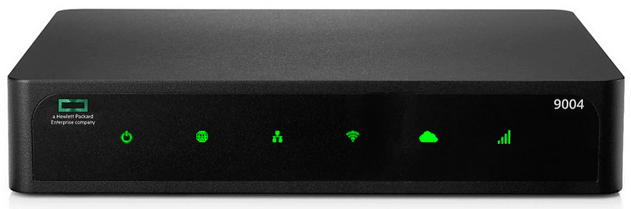
HPE Aruba 9004 Branch Gateway
Normal Status Lights
Light
|
STATUS
|
Description & Suggested Action
|
| SYSTEM | Solid Green | Powered ON and operational |
Flashing Green | Loading Software | Solid Amber | Critical Alarm | Flashing Amber | Major Alarm | Unlit | No Power | | WAN | | WAN connectivity status |
| LAN | Solid Green | All LAN ports established |
Solid Amber | No LAN ports established | | WIRELESS | Solid Green | The WLAN Gateway is up and functioning |
Flashing Green | WLAN Gateway booting | | CENTRAL CLOUD | | Central connectivity status |
| CELLULAR | Solid Green | Modem initialized and connected to the Network with good signal strength. Signal threshold >-65 dBm |
Flashing Green | Modem initializing | Solid Green + Amber | Average Signal Strength. SS threshold: <-65dBm >-80 dBm | Solid Amber | Poor Signal Strength. SS threshold: <-80dBm | Flashing Amber | Network connection Failure. SIM removal or modem is not responding to Web commands | Solid Red | Modem lost IP address of disconnected from the Network | Flashing Red | Hardware Failure. USB failure or unsupported USB device attached |
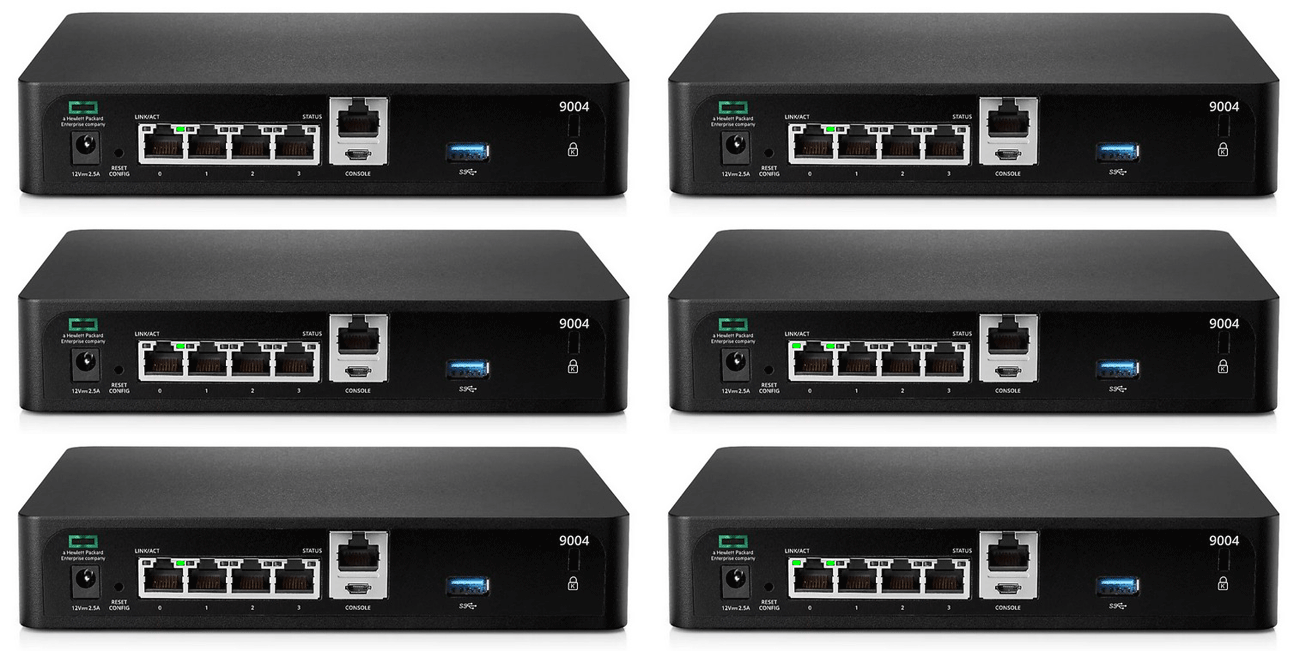
Light
|
STATUS
|
Description & Suggested Action
|
| LINK/ACT | Solid Green | Link established |
Flashing Green | Port is transmitting or receiving data | Unlit | No Link | | STATUS | Solid Green | Link at 1000 Mbps |
Unlit | Link at 100 Mbps |
For more information or to have your device listed please contact
Infotel Systems
The Story Behind "Status Lights"

 StatusLights.com