
 StatusLights.com

Cradlepoint E3000
Normal Status Lights
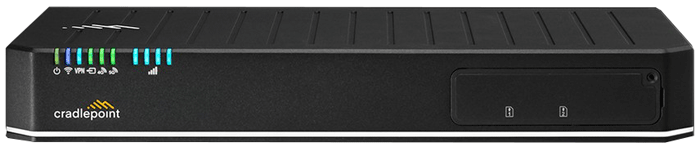
Light |
STATUS |
Description & Suggested Action |
| POWER | Unlit | Not receiving power | Green | Powered On | Yellow | Attention. Log into NetCloud Manager and troubleshoot connection issues |
| SIGNAL | Blue | Embedded modem is active | Green | Removable modem is active | Cyan | Remote modem is active |
| VPN | Blue | Connected to an active VPN | Green | Router is connected to a remote modem via WAN |
| LTE MODEM | Unlit | No removable modem detected | Green | Modem has established an active connection | Flashing Green | Modem is connecting | Flashing Yellow | Data connection error. No modem connection possible | Flashing Red | Modem is in the process of resetting |
| 4G/5G | Unlit | Modem not connected | Green | Modem has established an active WAN connection | Flashing Green | Modem is connecting | Yellow | Modem is not active | Flashing Yellow | Data connection error. No modem connection possible | Flashing Red | Modem is in the process of resetting |
| WI-FI | Blue | Wi-Fi is on and operating normally | Unlit | Wi-Fi is not operating |
Additional LEDs:
| ||