WatchGuard Firebox T115-W
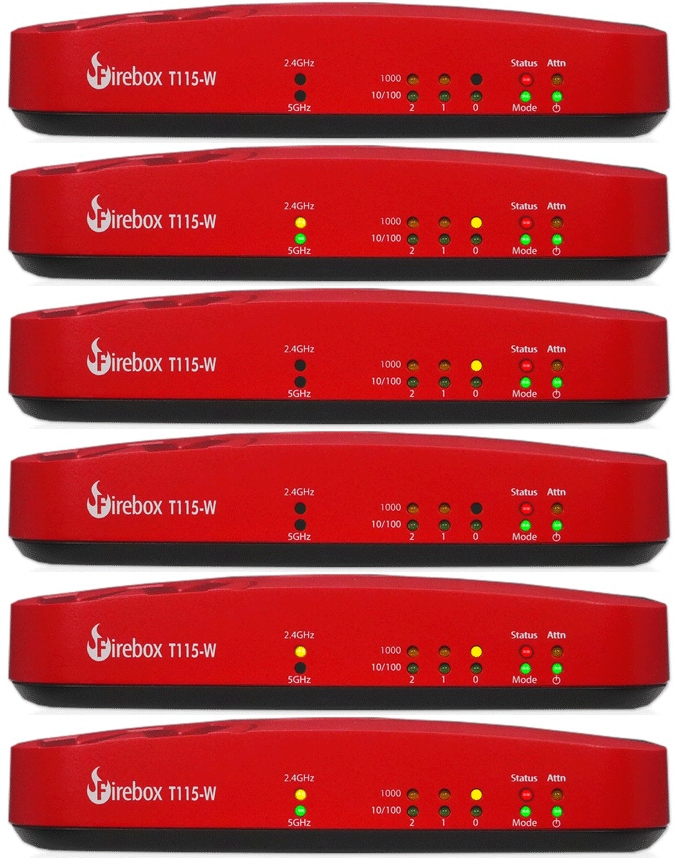
Normal Status Lights
Light
|
STATUS
|
Description & Suggested Action
|
| STATUS | Red | Indicator is Red when there is a management connection to the device. It is also lit for 30s after you connect to the device with Fireware Web UI or the CLI. It is also lit when the device is polled by WatchGuard System Manager. |
| MODE | Green | If the device can connect to the external network and send traffic the indicator is green. |
Flashing Green | Device cannot send traffic to the external network. | | ATTN | Yellow | Lit when you start the device with the Reset button pressed. |
| POWER | Green | Power is ON |
| 1000 | Yellow | 1000 Mbps |
| 10/100 | Green | 10 Mbps or 100 Mbps |
| 2.4 GHz | Yellow | Interface enabled, flashes to indicate network activity |
| 5 GHz | Green | Interface enabled, flashes to indicate network activity |
Light
|
STATUS
|
Description & Suggested Action
|
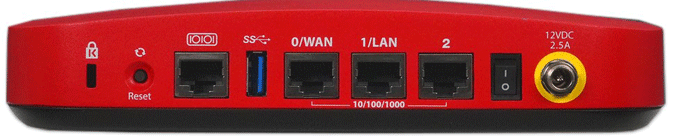
| KENSINGTON LOCK SLOT | | A Kensington security lock slot is available for use with a security cable to secure your device. |
| RESET | | This button resets the device to factory-default settings. For more information on how to use the reset button |
| SERIAL PORT | | The RJ45 serial console port enables serial connections to the device. |
| USB | | The device has two USB 3.0 Type-A interfaces. You can connect a USB storage device for USB backup and restore or to store a support snapshot. |
| NETWORK INTERFACES | | The Ethernet interfaces have standard RJ45 connectors. The first two interfaces are labeled 0/WAN and 1/LAN. The LED status indicators for the network interfaces are located on the front of the device. |
| POWER SWITCH | | Use the power switch to the control the power supplied to the device. |
| POWER INPUT | | An AC power adapter is included with the Firebox. Connect the AC adapter to the device and to a power source. Use only the supplied AC power adapter. |
Network Interfaces
The Ethernet interfaces have standard RJ45 connectors. The first two interfaces are labeled 0/WAN and 1/LAN. The LED status indicators for the network interfaces are located on the front of the device.
All interfaces support 10/100/1000 Mbps. |
For more information or to have your device listed please contact
Infotel Systems
The Story Behind "Status Lights"

 StatusLights.com