D-Link Guardian 600 PoE
Normal Status Lights
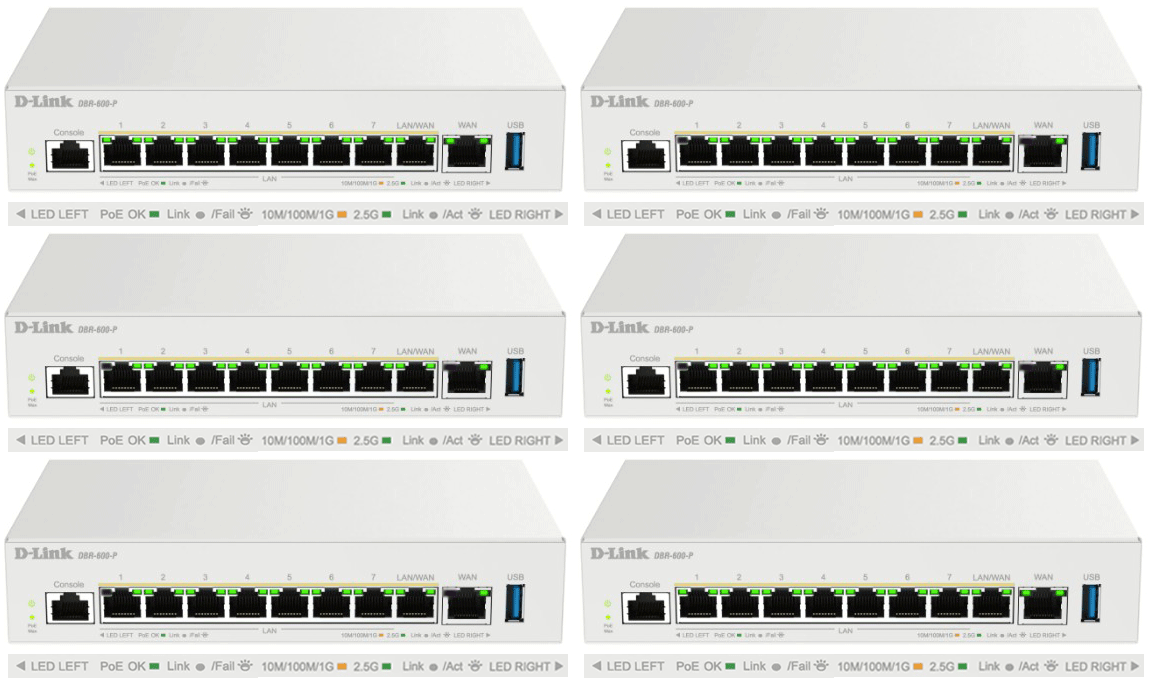
Light
|
STATUS
|
Description & Suggested Action
|
| POWER | Solid Green | Power is ON |
Flashing Green | Power on process/System is processing firmware upgrade or under recovery mode | Unlit | No Power | | PoE MAX | Solid Amber (Normal) | Total PoE output of device reaches or exceeds 105 Watts. In the meantime, no additional PoE device can be supported |
Flashing Amber | Total PoE output of devices reaches guard band mode (Max PoE budget < configured guard band value, default is 7 Watts) | Unlit | System power usage does not reach guard band mode | | LAN (Port 1-8 Left LED) | Solid Green | A 2.5 Gbps link is established |
Flashing Green | Port is transmitting or receiving data at 2.5 Gbps | Solid Amber | 10 Mbps, 100 Mbps or 1000 Mbps link established | Flashing Amber | Port is transmitting or receiving packets at 10 Mbps, 100 Mbps or 1000 Mbps | Unlit | No link established | | LAN (Port 1-8 Right LED) | Solid Green | Power feeding to plugged in device |
Fast Flashing Green | Error condition | Unlit | Not delivering PoE | | WAN (Port 9 Left LED) | Solid Green | Connected to a 2500 Mbps Ethernet device |
Flashing Green | Receiving/transmitting data at 2500 Mbps | Solid Amber | Connected to a 1000 Mbps Ethernet device | Flashing Amber | Receiving/transmitting data at 1000 Mbps | Unlit | No link established | | WAN (Port 9 Right LED) | Unlit | Port is not delivering PoE |
For more information or to have your device listed please contact
Infotel Systems
The Story Behind "Status Lights"

 StatusLights.com
