HPE Networking Instant On SG2505P
Normal Status Lights
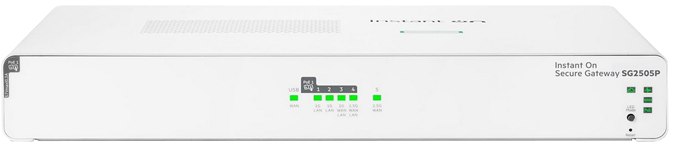
Light
|
STATUS
|
Description & Suggested Action
|
| GLOBAL | Solid Green | Device powered on and operating normally |
Slow Flashing Green | Device is booting up. All other LEDs are unlit | Fast Flashing Green | Locator function is enabled to help physically locate the standalone unit, stack or a specific unit within the stack | Slow Flashing Amber | System fault detected. Blinks in unison with affected sunsystem (PoE or Cloud) | Unlit | No power to the device | | CLOUD | Solid Green | Fullu operational and in Cloud Manage Mode |
Slow Flashing Green | In the process of establishing a connection to the Cloud portal | Solid Amber | Unable to connect to the Cloud | Slow Flashing Amber | Onboarding issue. Flashes in unison with the Amber Global Status LED | Flashing Green/Amber | Device is connected to the Cloud portal and is ready for setup through the mobile App/Portal. This state is temporary while the device is connected to the Cloud portal but not fully setup | Unlit | Onboarding period is over. Reboot the Gateway to initiate new onboarding | | WAN | Solid Green | WAN mode is selected. Port LEDs indicate WAN status |
Slow Flashing Green | WAN mode not selected and at least one WAN is offline or connecting | Unlit | WAN mode is not selected | | PoE | Solid Green | PoE mode is selected and there is no fault. Port LEDs indicate PoE status |
Slow Flashing Green | PoE mode has not been selected and there is insufficient power to power all ports | Solid Amber | PoE mode is selected and a port has an internal PoE hardware failure. The specific port LED with the fault will also flash | Slow Flashing Amber | PoE mode has not been selected but a port has an internal PoE hardware failure. Flashes in unison with Amber Global Status LED | Unlit | PoE mode is not selected and there are no PoE hardware failures or denied power on ports |
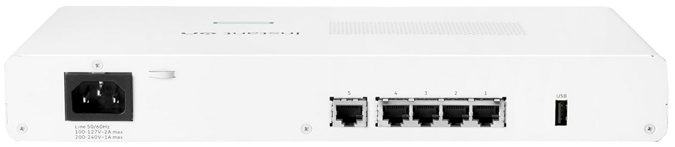
Light
|
STATUS
|
Description & Suggested Action
|
| Link/Activity | Solid Green | Port is active, link has been established |
Flashing Green | Port has activity, blink rate proportional to utilization | Solid Amber | Port has experienced a fault | Unlit | Port is inactive | | WAN | Solid Green | Port is in WAN mode - Failover enabled |
Solid Amber | Connectivity fault | Unlit | Port is in LAN mode - no failover | | PoE | Solid Green | Port is delivering PoE |
Slow Flashing Green | Port denied power or power revoked | Slow Flashing Amber | Port PoE fault with detect or class issue. Flashes in unison with Amber Global Status LED | Unlit | Port not delivering PoE | WAN Note: When the device is not yet onboarded, the default WAN ports are considered offline if the onboarding server is not reachable.
PoE Slow Flashing Green Note: Does not have precedence over "Amber (Slow Flash)".
PoE Slow Flashing Amber Note: Has precedence over "Green (Slow Flash)'. |
For more information or to have your device listed please contact
Infotel Systems
The Story Behind "Status Lights"

 StatusLights.com
